
Namecheap CLI
A CLI to list/add/remove/update DNS records for a Namecheap managed domain using only standard Go libraries.
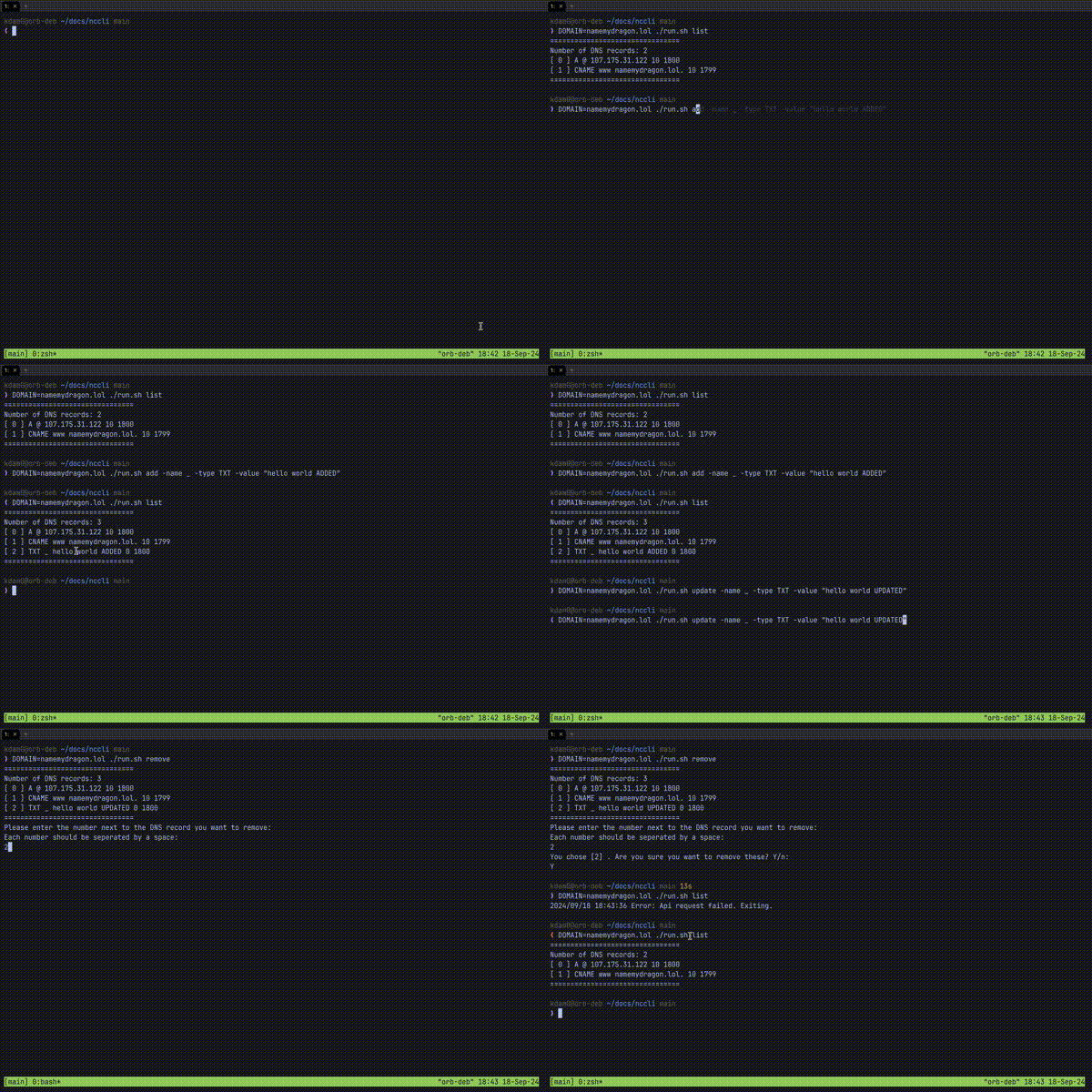
Why
At the time of writing, there is no simple way to "add" DNS records to my Namecheap domain from the CLI, since strictly "adding" is not supported. Instead, we have to first get all the current records and include the new one as part of the setHosts method. This would involve a bunch of XML parsing which is beyond my bash-fu.
Pre-Requisites
You must setup an API Access Key, and whitelist your access IP. Follow instructions for Enabling API Access.
Usage
Available sub-commands:
* list: show all DNS records currently configured.
* add: add a DNS record.
* update: update an existing DNS record.
* remove: remove existing DNS record(s).
You will be prompted for which record(s) you want to remove.
Non-Docker
- Build:
go build nccli.go
- Create
nccli.envfile with content:
API_USER="[ your namecheap user ]"
API_KEY="[ your namecheap api access key ]"
ACCESS_IP="[ your namecheap api whitelisted IP ]"
- Run:
DOMAIN=[ your namecheap domain (eg. foo.xyz) ] ./run.sh list
# OR
source nccli.env
DOMAIN=[ your namecheap domain (eg. foo.xyz) ] ./nccli list
Docker
docker run --rm -it --name nctest \
    -e API_USER="[ your namecheap user ]" \
    -e API_KEY="[ your namecheap api access key ]" \
    -e ACCESS_IP="[ your namecheap api whitelisted IP ]" \
    -e DOMAIN="[ your namecheap domain (eg. foo.xyz) ]" \
    registry.gitlab.com/kdam0/nccli:[your architecture] \
    /bin/nccli list
Example Outputs:
Usage of add:
  -name string
        Name of DNS record.
  -priority int
        Value of the DNS record.
  -ttl int
        TTL of the DNS record. (default 1800)
  -type string
        Type of DNS record.
  -v    Verbosity. More output. Default=false.
  -value string
        Value of the DNS record.
Images are available for the following architectures: * linux/amd64 * linux/arm32v7
How to use it to automate Certbot DNS verification
Certbot does not have a DNS plugin for Namecheap, so we rely on its
--manual-auth-hook flag to run a script to place DNS records
it generates into our Namecheap domain so that it can complete DNS verification.
Docs.
Eg. certbot cmd:
certbot \
    certonly -n --agree-tos --email [your email] \
    --config-dir [default: /etc/letsencrypt] \
    --work-dir [default: /etc/letsencrypt] \
    --logs-dir /tmp/letsencrypt \
    --server https://acme-v02.api.letsencrypt.org/directory \
    --manual --preferred-challenges=dns \
    --manual-auth-hook /path/to/auth.sh \
    -d '*.wildcard.domain'
where auth.sh is:
#!/bin/bash

API_USER="[ your namecheap user ]"
API_KEY="[ your namecheap api access key ]"
API_ACCESS_IP="[ your namecheap api whitelisted IP ]"
DOMAIN="[ your namecheap domain (eg. foo.xyz) ]"

echo "CERTBOT DOMAIN: ${CERTBOT_DOMAIN}"
echo "CERTBOT VALUE: ${CERTBOT_VALIDATION}"

# Create TXT record
docker run --rm -it \
        --name nctest \
        -e API_USER="${API_USER}" \
        -e API_KEY="${API_KEY}" \
        -e ACCESS_IP="${API_ACCESS_IP}" \
        -e DOMAIN="${DOMAIN}" \
        registry.gitlab.com/kdam0/nccli \
        /bin/nccli \
            add \
            -name "_acme-challenge" \
            -value "${CERTBOT_VALIDATION}" \
            -type "TXT" \
            -priority 11 \
            -ttl 60

# Save info for cleanup
if [ ! -d /tmp/CERTBOT_$CERTBOT_DOMAIN ];then
        mkdir -m 0700 /tmp/CERTBOT_$CERTBOT_DOMAIN
fi

# Sleep to make sure the change has time to propagate over to DNS
sleep 45
After the certbot cmd, we can run nccli delete command to remove the
temporary entries added.