1
2
3
4
5
6
7
8
9
10
11
12
13
14
15
16
17
18
19
20
21
22
23
24
25
26
27
28
29
30
31
32
33
34
35
36
37
38
39
40
41
42
43
44
45
46
47
48
49
50
51
52
53
54
55
56
57
58
59
60
61
62
63
64
65
66
67
68
69
70
71
72
73
74
75
76
77
78
79
80
81
82
83
84
85
86
87
88
89
90
91
92
93
94
95
96
97
98
99
100
101
102
103
104
105
106
107
108
109
110
111
112
113
114
115
116
117
118
119
120
121
122
123
124
125
126
127
128
129
130
131
132
133
134
135
136
137
138
139
140
141
142
143
144
145
146
147
148
149
150
151
152
153
154
155
156
157
158
159
160
161
162
163
164
165
166
167
168
169
170
171
172
173
174
175
176
177
178
179
180
181
182
183
184
185
186
187
188
189
190
191
192
193
194
195
196
197
198
199
200
201
202
203
204
205
206
207
208
209
210
211
212
213
214
215
216
217
218
219
220
|
# My Homelab Setup
**This is still very much un-stable, and very much a work-in-progress.**
So I decided to migrate *most* of my remote VPS to a self-hosted private server. There are 3 reasons for this:
1. Cost savings. VPS SSD storage can get quite [expensive](https://racknerd.com/kvm-vps) as your storage demands increase. Meanwhile I have a few SSDs lying my house around not being utilized.
2. Learning experience. There are many parts of the self-hosting stack that I'm not familiar with, and I am hoping to get more familiar with them as part of this exercise.
3. I want to be able to be to reproduce all of the tooling I use, as quickly as possible in a "doomsday" scenario, so I need it automated.
My requirements are as follows:
| Status | Feature | Choice |
| ------------------ | ----------------------------------------------------- | ------------------------------------------- |
| | Email | n/a |
| :heavy_check_mark: | Syncing/Sharing files, calender, contacts, tasks etc. | [Nextcloud](https://nextcloud.com/) |
| :heavy_check_mark: | Hosting misc. static websites | [Nginx](https://www.nginx.com/) |
| :heavy_check_mark: | Media (pictures, tv, movies) Server | [Jellyfin](https://jellyfin.org/) |
| :heavy_check_mark: | Meta Search Engine | [Searxng](https://docs.searxng.org/) |
| :heavy_check_mark: | Music Server | [Navidrome](https://www.navidrome.org/) |
| :heavy_check_mark: | Network accessible storage for media | [Samba](https://www.samba.org/) |
| :heavy_check_mark: | Password Hosting/Share | [Bitwarden](https://bitwarden.com/) |
| :heavy_check_mark: | VPN | [Wireguard](https://www.wireguard.com/) |
| :heavy_check_mark: | Torrents | [Transmission](https://transmissionbt.com/) |
| :heavy_check_mark: | Media downloader | [Sonarr](https://github.com/Sonarr/Sonarr), [Radarr](https://github.com/Radarr/Radarr), [Prowlarr](https://github.com/Prowlarr/Prowlarr) |
> Consider items marked as :heavy_check_mark: above to be implemented in this repo.
> You may notice more [roles](./roles) than listed here. This is due to me trying other options for that feature, eg. "seafile" for file hosting. Feel free to use that instead.
Ideally, I would also like to be space efficient as I currently don't have space for a proper server-rack.
I don't want it to make a lot of (any?) noise.
I don't want it to have much of an impact on my utility (power) bill, which of course also implies that it should not generate
so much heat that it requires advanced cooling.
## Architecture

Notice that this setup requires a very small VPS since we are just running a wireguard client on it. All storage, and compute is being done by the Home Server. This means that my cost went from ~ $13/mo to ~ $1/mo for the VPS service, *while* increasing my SSD storage capacity from 50GB to 2TB (or whatever you have lying around)! And this does not incude the cost savings from self-hosting many of these services in the first place.
### Tradeoffs
* I haven't factored in the cost of the hardware I'm putting to use or the cost of future replacement hardware, or the utility (power) cost of running these locally.
* VPS service providers have certain uptime guarantees that factors into their end-user pricing, especially with extra storage. No such guarantees exist with this setup, but things can be done to get most of the way there (which has its own time/effort, and equipment costs).
* Maintenance of these self-hosted services. But the way I see it, having it automated allows me to 1. minimize the time/effort spent on maintenance, and 2. to potentially turn this into a profitable venture for a growing privacy-minded audience - which at ~$13/mo would be a lot less profitable.
There are many cheap VPS providers out there. I use Racknerd now. I have used Vultr previously. Both are good in-terms of technical support.
## Pre-requisites
### Equipment
1. Raspberry Pi 4B (4GB).
2. USB Hub with **with its own power source**.
3. 2 X TiB external usb SSDs or HDDs for our network-attached-storage (NAS).
4. (optional, but recommended) 1 external usb SSD or HDD as a backup drive.
5. A very cheap VPS - I use Racknerd.
### Base Image setup
For numerous reasons, I have switched to using Alpine Linux `aarch64` as the base OS image.
Going forward this repo will primarily be geared towards it.
That being said, all existing roles will continue to work on Raspi OS (debian) based images as well.
1. Follow instructions from [Alpine wiki](https://wiki.alpinelinux.org/wiki/Raspberry_Pi) to create a bootable SD card.
2. During the `setup-alpine` process, select the **sys** mode for a persistent install.
3. Reboot
4.
```bash
# TODO: Make these tasks part of an Ansible role.
echo "dtoverlay=gpio-fan,gpiopin=14,temp=70000" > /boot/usercfg.txt
# enable community packages in /etc/apk/repositories
# enable http://dl-cdn.alpinelinux.org/alpine/edge/testing
apk update
apk upgrade
apk add vim nnn htop bmon rsync py3-pip
apk add wireguard-tools docker docker-compose certbot
modprobe wireguard
# add wireguard to /etc/modules #
# docker stuff
addgroup username docker
rc-update add docker boot
service docker start
```
5. Continue to the NAS Setup section.
### NAS Setup
As a minimum, I recommend setting up two of the external usb drives as a ZFS mirrored pool.
This will allow you to lose up to one drive at a time, and still operate in a degraded state while you replace it.
```bash
# install zfs
apk add udev zfs
modprobe zfs
# add zfs to /etc/modules #
# verify install
zfs --version
rc-update add udev sysinit
rc-update add udev-trigger sysinit
# assuming your first drive is /dev/sda
zpool create yourpool /dev/sda
zpool export yourpool
zpool import -d /dev/disk/by-id/usb-Samsung_PSSD_T7_Shield_S6SMNS0T701007V-0:0-part1 yourpool -N
zfs set mountpoint=/mnt/yourpool yourpool
# create datasets
zfs create yourpool/media
zfs create yourpool/data
# for encrypted datasets
zfs create -o encryption=on -o keylocation=prompt -o keyformat=passphrase yourpool/priv
# add the second drive to the pool
zpool attach yourpool usb-Samsung_PSSD_T7_Shield_S6SMNS0T701007V-0:0 usb-Samsung_PSSD_T7_S5T3NJ0N907662T-0:0
# zfs useful cmds
zpool scrub yourpool
zpool status -v yourpool
zfs get mountpoint
zfs mount -l yourpool/data
zfs mount -l yourpool/media
zfs mount -l yourpool/priv # will prompt for passphrase
```
At the end of this, you should at least have `/mnt/yourpool/media` and `/mnt/yourpool/data`.
These will be auto mounted at boot.
These are the volumes assumed by our Ansible playbooks as `vol_media`, and `vol_data` - see the hosts file.
## Monitoring
I'd like to monitor the following:
- Basic cpu, mem, disk metrics.
- Service level metrics with alerts when a service is down.
- ZFS metrics.
- CPU temp, Power consumption etc.
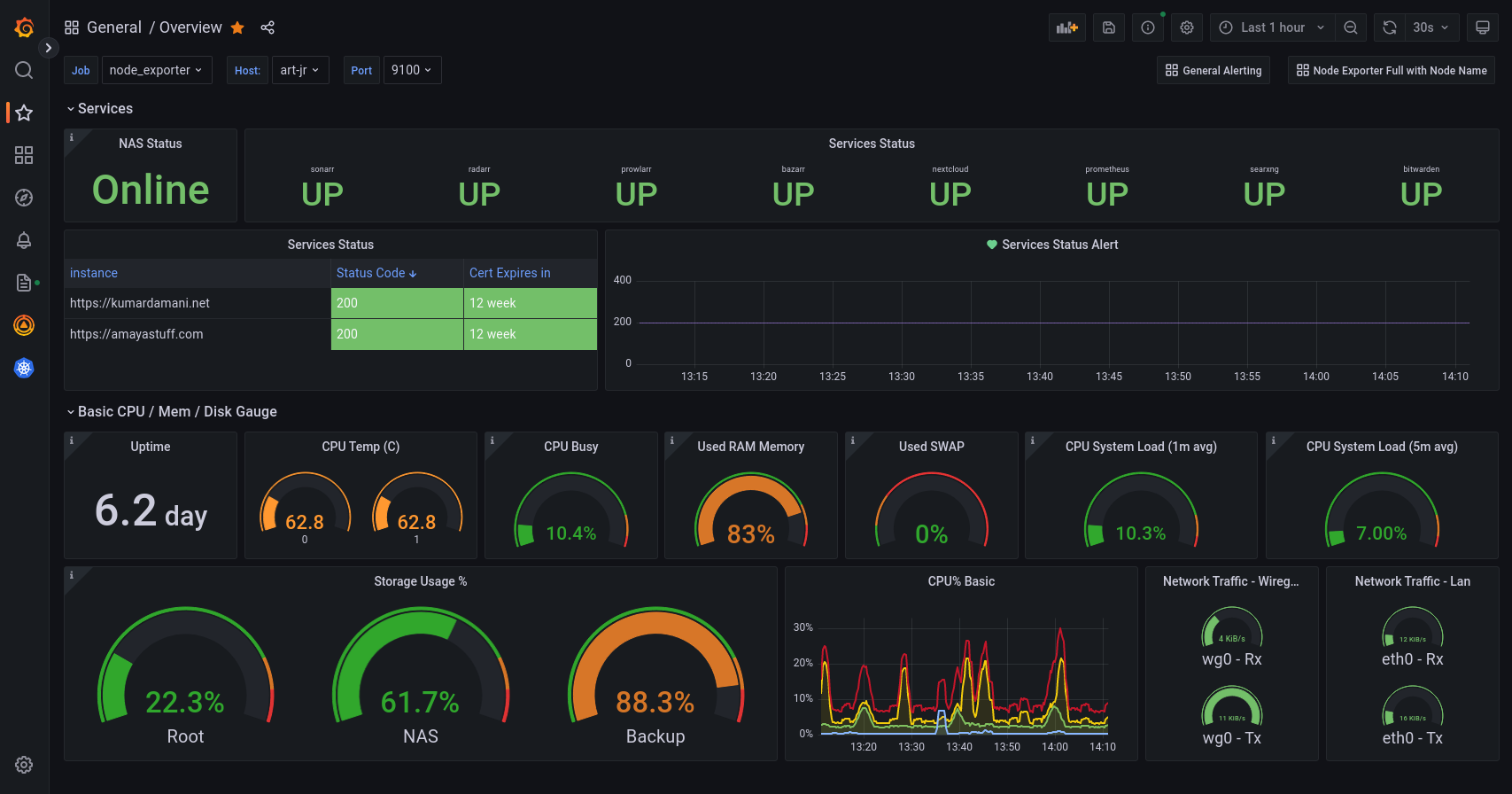
You can get this dashboard [here](https://grafana.com/grafana/dashboards/15980).
## Install
1. Fork this repo.
2. Clone you fork with `git clone`
3. Change directory to this repo `cd vps`.
4. Setup repo by running all of the following:
```bash
# install dependencies for this project in a venv
make install
# remove my vault files
rm -f hosts.vault group_vars/all/vault
# copy all the example files
cp -a vaultid.example vaultid
cp -a hosts.example hosts
cp -a group_vars/all/vault.example group_vars/all/vault
```
## Develop
1. Set your vaultid value to your password. Default: `test`.
2. Modify the [playbooks](./playbooks/) per your needs.
3. Modify the vault per your needs: `make vault-edit group=all`.
4. Modify the [hosts](./hosts/) file per your needs.
5. Modify the [vars](./group_vars/all/vars.yaml/) file per your needs.
Encrypt your hosts file, and secret vars before uploading to git:
```bash
ansible-vault encrypt --vault-id vaultid --output hosts.vault hosts
ansible-vault encrypt --vault-id vaultid --output group_vars/all/vault group_vars/all/vault
```
## Deploy
```bash
# run main playbook with your apps
make file=playbooks/deploy.yaml tags="[tag list]"
# (and if applicable secondary playbook)
make file=playbooks/vps.yaml
```
## Example CI/CD
For the sites that I host, I like to let the owners manage their own source-code on Gitlab, which gets auto deployed to my setup thanks to the `website` tag. This way I don't need to be involved for most day-to-day updates. Eg. `.gitlab-ci.yml`:
```yaml
image: 'python:3-slim-buster'
before_script:
- 'command -v ssh-agent >/dev/null || ( apt-get update -y && apt-get install openssh-client -y )'
- eval $(ssh-agent -s)
- echo "$SSH_PRIVATE_KEY" | tr -d '\r' | ssh-add -
- mkdir -p ~/.ssh
- chmod 700 ~/.ssh
- '[[ -f /.dockerenv ]] && echo -e "Host *\n\tStrictHostKeyChecking no\n\n" >> ~/.ssh/config'
stages:
- deploy
deploy-job:
stage: deploy
script:
- apt update -y && apt install -y git make sshpass
- echo "Deploying application..."
- git clone --branch master --depth 1 https://gitlab.com/kdam0/vps.git
- cd vps
- echo $VAULT_PASS > vaultid
- make install
- make run file=playbooks/deploy.yaml tags="websites" args="-v"
- echo "Application successfully deployed!"
```
> You need to have the vars `VAULT_PASS`, and `SSH_PRIVATE_KEY` set in the CI/CD settings for each such repo.
## Example backup script
```bash
#!/bin/sh
doas mkdir -p /mnt/backup
doas chown -R 1000:1000 /mnt/backup
echo ""
echo "------Backup started------"
echo `date`
echo "--------------------------"
rsync -avph --delete --info=progress2 /mnt/kdpool/media/media /mnt/backup/
rsync -avph --delete --info=progress2 /mnt/kdpool/media/pics /mnt/backup/
rsync -avph --delete --info=progress2 /mnt/kdpool/media/music /mnt/backup/
echo "-------Backup ended-------"
```
## Future Plans
1. Pi Hole (in progress).
2. Better docs for each role.
## Why self-host?
You can read more about my thoughts on why we should self-host on my [website](https://kumardamani.net).
|
