1
2
3
4
5
6
7
8
9
10
11
12
13
14
15
16
17
18
19
20
21
22
23
24
25
26
27
28
29
30
31
32
33
34
35
36
37
38
39
40
41
42
43
44
45
46
47
48
49
50
51
52
53
54
55
56
57
58
59
60
61
62
63
64
65
66
67
68
69
70
71
72
73
74
75
76
77
78
79
80
81
82
83
84
85
86
87
88
89
90
91
92
93
94
95
96
97
98
99
100
101
102
103
104
105
106
107
108
109
110
111
|
# My VPS Setup
**This is still very much un-stable, and very much a work-in-progress.**
So I decided to migrate *most* of my remote VPS to a self-hosted private server. There are 3 reasons for this:
1. Cost savings. VPS SSD storage can get quite [expensive](https://racknerd.com/kvm-vps) as your storage demands increase. Meanwhile I have a few SSDs lying my house around not being utilized.
2. Learning experience. There are many parts of the self-hosting stack that I'm not familiar with, and I am hoping to get more familiar with them as part of this exercise.
3. I want to be able to be to reproduce all of the tooling I use, as quickly as possible in a "doomsday" scenario, so I need it automated.
My requirements are as follows:
| Status | Feature | Choice |
| ------------------ | ------------------------------------------- | --------------------------------------- |
| | Email | n/a |
| :heavy_check_mark: | Hosting/Sharing files, calender, tasks etc. | [Nextcloud](https://nextcloud.com/) |
| :heavy_check_mark: | Hosting misc. static websites | [Nginx](https://www.nginx.com/) |
| :heavy_check_mark: | Media (pictures, tv, movies) Server | [Jellyfin](https://jellyfin.org/) |
| :heavy_check_mark: | Music Server | [Navidrome](https://www.navidrome.org/) |
| :heavy_check_mark: | Network accessible storage for media | [Samba](https://www.samba.org/) |
| :heavy_check_mark: | Password Hosting/Share | [Bitwarden](https://bitwarden.com/) |
| :heavy_check_mark: | VPN | [Wireguard](https://www.wireguard.com/) |
> Consider items marked as :heavy_check_mark: above to be implemented in this repo.
> You may notice more [roles](./roles) than listed here. This is due to me trying other options for that feature, eg. "seafile" for file hosting. Feel free to use that instead.
## Architecture

Notice that this setup requires a very small VPS since we are just running a wireguard client on it. All storage, and compute is being done by the Home Server. This means that my cost went from ~ $13/mo to ~ $1/mo for the VPS service, *while* increasing my SSD storage capacity from 50GB to 2TB (or whatever you have lying around)! And this does not incude the cost savings from self-hosting many of these services in the first place.
### Tradeoffs
* I haven't factored in the cost of the hardware I'm putting to use or the cost of future replacement hardware, or the utility (power) cost of running these locally.
* VPS service providers have certain uptime guarantees that factors into their end-user pricing, especially with extra storage. No such guarantees exist with this setup, but things can be done to get most of the way there (which has its own time/effort, and equipment costs).
* Maintenance of these self-hosted services. But the way I see it, having it automated allows me to 1. minimize the time/effort spent on maintenance, and 2. to potentially turn this into a profitable venture for a growing privacy-minded audience - which at ~$13/mo would be a lot less profitable.
There are many cheap VPS providers out there. I use Racknerd now. I have used Vultr previously. Both are good in-terms of technical support.
## Monitoring
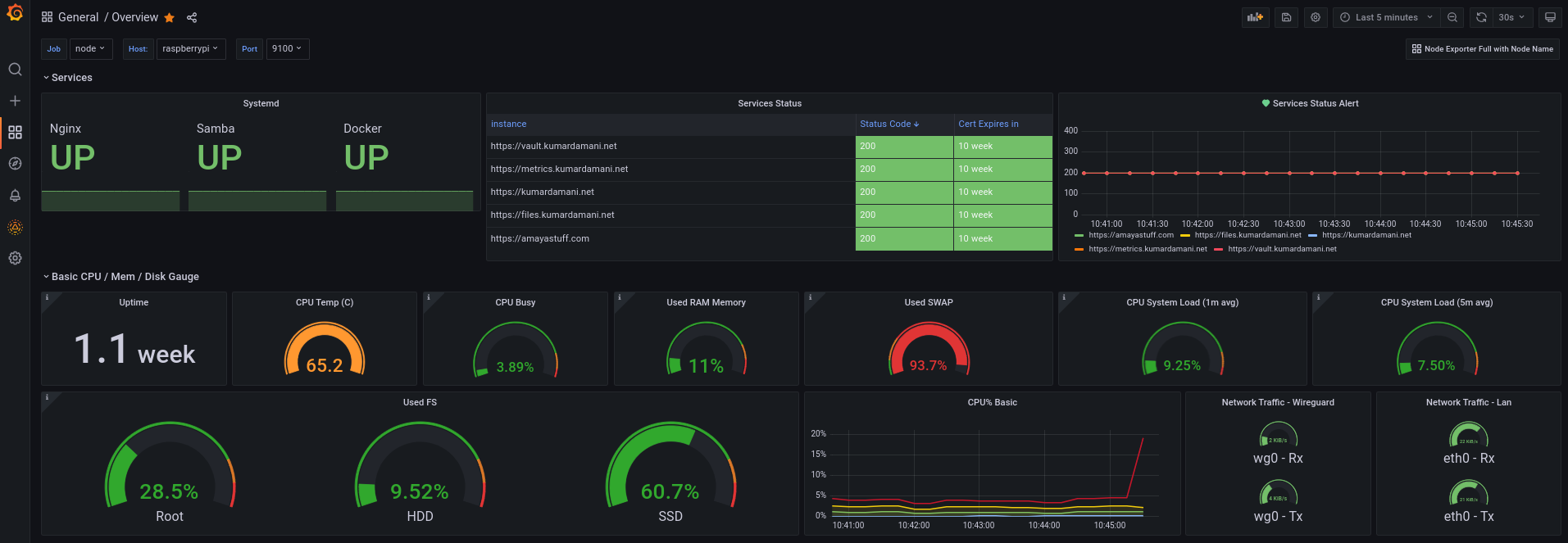
You can get this dashboard [here](https://grafana.com/grafana/dashboards/15980).
## Install
1. Fork this repo.
2. Clone you fork with `git clone`
3. Change directory to this repo `cd vps`.
4. Setup repo by running all of the following:
```sh
# install dependencies for this project in a venv
make install
# remove my vault files
rm -f hosts.vault group_vars/all/vault
# copy all the example files
cp -a vaultid.example vaultid
cp -a hosts.example hosts
cp -a group_vars/all/vault.example group_vars/all/vault
```
## Develop
1. Set your vaultid value to your password. Default: `test`.
2. Modify the [playbooks](./playbooks/) per your needs.
3. Modify the vault per your needs: `make vault-edit group=all`.
4. Modify the [hosts](./hosts/) file per your needs.
5. Modify the [vars](./group_vars/all/vars.yaml/) file per your needs.
Encrypt your hosts file, and secret vars before uploading to git:
```sh
ansible-vault encrypt --vault-id vaultid --output hosts.vault hosts
ansible-vault encrypt --vault-id vaultid --output group_vars/all/vault group_vars/all/vault
```
## Deploy
```sh
# run main playbook with "base" tag
make file=playbooks/deploy.yaml tags="base"
# run main playbook with your apps
make file=playbooks/deploy.yaml tags="[csv list]"
# (and if applicable secondary playbook)
make file=playbooks/vps.yaml
```
## Example CI/CD
For the sites that I host, I like to let the owners manage their own source-code on Gitlab, which gets auto deployed to my setup thanks to the `website` tag. This way I don't need to be involved for most day-to-day updates. Eg. `.gitlab-ci.yml`:
```yaml
image: 'python:3-slim-buster'
before_script:
- 'command -v ssh-agent >/dev/null || ( apt-get update -y && apt-get install openssh-client -y )'
- eval $(ssh-agent -s)
- echo "$SSH_PRIVATE_KEY" | tr -d '\r' | ssh-add -
- mkdir -p ~/.ssh
- chmod 700 ~/.ssh
- '[[ -f /.dockerenv ]] && echo -e "Host *\n\tStrictHostKeyChecking no\n\n" >> ~/.ssh/config'
stages:
- deploy
deploy-job:
stage: deploy
script:
- apt update -y && apt install -y git make sshpass
- echo "Deploying application..."
- git clone --branch master --depth 1 https://gitlab.com/kdam0/vps.git
- cd vps
- echo $VAULT_PASS > vaultid
- make install
- make run file=playbooks/deploy.yaml tags="website" args="-v"
- echo "Application successfully deployed!"
```
> You need to have the vars `VAULT_PASS`, and `SSH_PRIVATE_KEY` set in the CI/CD settings for each such repo.
## Future Plans
1. Documentation for each role.
2. Backups.
3. Redundancy.
|
